Why I Moved From Vercel to a VPS
The managed-everything approach is great for getting started, but at some point the fragmentation adds up. Here is why I moved my project to a self-hosted VPS and what I gained.
The recommended stack for solo developers launching a SaaS has been the same for a few years: Vercel for the frontend, Railway or Render for the backend, a managed Postgres somewhere, Redis somewhere else. All free to start. All someone else's problem to maintain.
It is genuinely good advice and I followed it. But somewhere along the way I started questioning whether "managed everything" was the right long-term move, or just the easiest short-term one.
So I bought a VPS instead. Here is what changed.
The Fragmentation Problem
Nothing was broken with the original setup. Vercel deploys Next.js beautifully. Railway handles Node apps without complaint. The developer experience across the board is excellent.
The issue was fragmentation. Every service I added was another vendor, another pricing page, another dashboard, another set of environment variables to juggle. I was building a product on top of five other SaaS products, each with its own free tier limits, scaling curves, and the ever-present risk of a pricing change.
Add a managed Postgres, a managed Redis, a CDN, a transactional email service, an error tracker. Suddenly you have eight different invoices to reconcile the moment you get real users. That is vendor management, not infrastructure.
The Setup
I provisioned a single OVH VPS: 6 vCores, 12 GB RAM, 100 GB NVMe SSD, running Ubuntu 24.04 LTS, at €11.75/month with no commitment.
Then I installed Coolify, an open-source self-hosted PaaS that gives you the experience of Vercel and Railway on hardware you own.
curl -fsSL https://cdn.coollabs.io/coolify/install.sh | sudo bashThat single command installs Docker, pulls all required images, and starts the Coolify dashboard. A few minutes later you have a working deployment platform accessible at your own domain with automatic SSL.
Open the dashboard immediately after installation and create your admin account. The registration page is public until someone claims it.
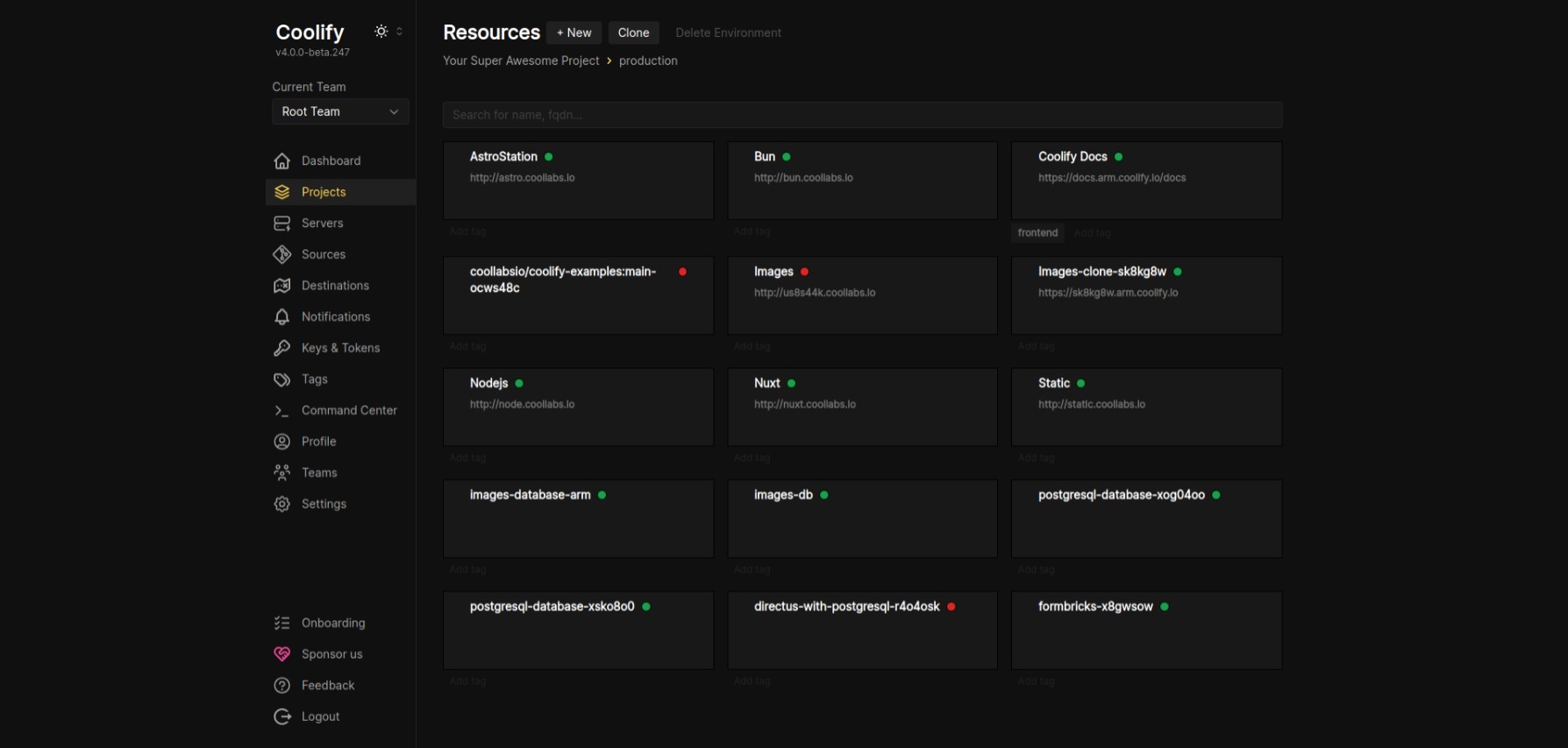
What You Actually Gain
One predictable cost. €11.75 a month, full stop. Not €11.75 plus the managed Postgres tier plus the Redis usage charges plus the bandwidth overage you did not notice. One number. One invoice. When your product starts generating revenue you know exactly what your infrastructure costs.
The freedom to deploy anything. On managed platforms every new service is a decision that costs money. On a VPS, if the hardware has capacity you just deploy. Want to spin up a WordPress site for a client? One click in Coolify and it is live in two minutes with its own subdomain. A Discord bot running 24/7 without leaving your laptop on? Deploy it as a container alongside everything else. An n8n automation server, a staging environment, a monitoring tool. It all shares the same box and the same monthly bill.
With 12 GB of RAM you can comfortably run several full-stack applications simultaneously alongside their databases. What would have required separate Railway services and separate billing now lives on a single server.
No artificial platform limits. Vercel's hobby plan caps function execution time, deployment frequency, and bandwidth. These limits exist for good business reasons, but they create friction that has nothing to do with your product's actual needs. A VPS has physical limits. Those limits are predictable, measurable, and upgradeable on your own terms.
The same deploy workflow. This is what surprised me most. Coolify gives you git-based deploys, automatic SSL, environment variable management, and log streaming. The same workflow Vercel and Railway provide, running on infrastructure you control. Connect your GitHub repo, push to main, watch the build logs. The transition was far less disruptive than expected.
Full visibility into your stack. Setting up a VPS properly means understanding what is actually running and why. I configured ufw, hardened SSH, set up fail2ban, and learned enough about Docker's iptables behavior to fix things when they broke.
# Docker bypasses UFW, block exposed ports via DOCKER-USER chain instead
sudo iptables -I DOCKER-USER -i ens3 -p tcp --dport 8080 -j DROP
sudo netfilter-persistent save
That level of visibility matters when you are eventually holding customer data. On managed platforms you trust the vendor's security posture. On a VPS you define your own.
The Honest Tradeoffs
This is not a "VPS is objectively better" argument. It is situational.
You take on operational responsibility. The server does not patch itself, though unattended-upgrades helps significantly. Backups, monitoring, uptime: that is on you. If something breaks at 3am there is no support team to call.
Setup takes real time. Getting a production-ready VPS properly configured took a full day. SSH hardening, firewall rules, Docker networking quirks, iptables rules that UFW does not cover. That is a full day you are not shipping product. Vercel takes five minutes.
And self-hosted tooling is not the same as managed tooling. Coolify is excellent and improving fast, but some things require dropping into a terminal. You need to be comfortable with Linux.
Who Should Make This Move
If you are pre-product with zero validated users, stick with Vercel and managed services. The free tiers are generous, the DX is excellent, and the time you save on infrastructure is better spent on product. The managed-everything approach optimizes for speed to first deploy, and that is exactly the right optimization when you have not proven anything yet.
The VPS starts making sense once you are past initial validation and starting to think about unit economics. When you are running multiple services that each want their own account, when the free tiers are starting to feel like a ceiling rather than a runway, when you want to know your infrastructure cost before you figure out your pricing model. That is when owning the machine earns its keep.
The Result
An entire production stack (Next.js frontend, Node.js backend API, Postgres with pgvector, Redis) running on a single VPS for less than the cost of one managed Postgres instance on a paid plan. Every future project or tool I need to run goes on the same box at no additional cost.
Sometimes the simpler choice is also the cheaper one.
Thanks for reading!